

So several months ago back when I bought this, an immediate change I noticed to a previous saved game of mine was that the ability to create "masterworks" was removed, as was the mention of it from the skill description. cut to lots of me uninstalling and reinstalling the game, verifying files, starting new saves, nothing works, and I didn't really feel like grabbing mods to fix it as I feel that takes away from beating the game for the first time. this was a two part issue but part two was fixed during my scuffle trying to figure it out before resigning that a patch just removed it for some reason.
anyways a few days ago I finally figured out the patches were not supposed to remove it so here I am reporting this problem I've had for a while.
that part two was from another forum mentioned but basically art quality regressed to the lowest tier instead of being the highest available. I have that fixed.
I did not realize there was a specific section for things made in ONI: Spaced Out specifically when making this. I have no idea how to transfer this over there.
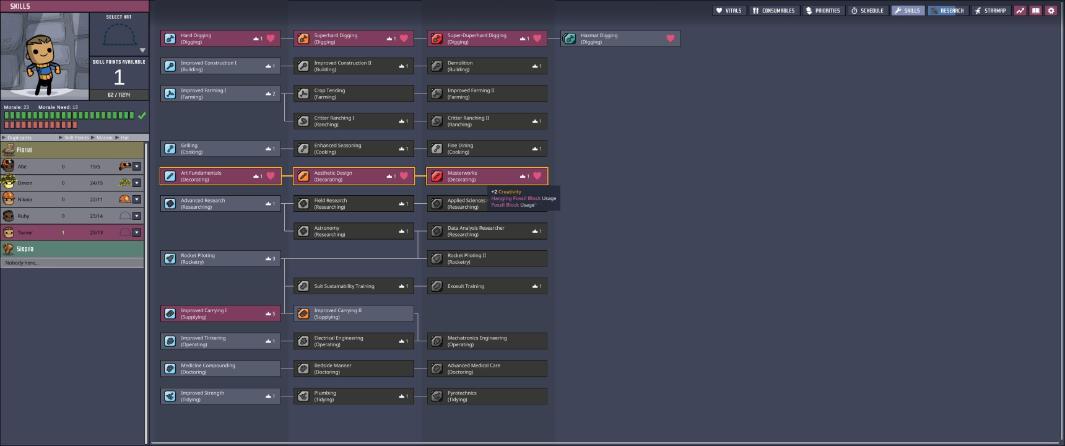
it was literally just buying the DLC, installing it, and then trying to boot up an old save. I have no idea how it works but here's the saves.
I don't know what it could be if uninstalling and reinstalling couldn't fix it.
only thing I didn't try was removing the prehistoric planet pack itself. (whole game deleted everything with it, everything installed in all at once to check if it was fixed)
there's two minor saves in between these but this is my current save (temporal capital) and the save where it showed up (luckless bunker)
theoretically either of these with everything except the cosmetics pack and the water planet dlc should be enough to recreate it.
I tried searching for app data but there was nothing in either documents or in the game local files. if it's just a crash log then I'm happy to report this game has never crashed.
I doubt this has the space to send my entire copy of the game to be flipped through but if it for some reason on your end it shows "masterwork quality" I'm going to assume that installing the DLC somehow corrupted only that one thing somehow. anyways I don't know where that would be stored or how to fix it so if that is the problem advice of how to fix it would be appreciated.
A developer has marked this issue as fixed. This means that the issue has been addressed in the current development build and will likely be in the next update.
Create an account or sign in to comment
You need to be a member in order to leave a comment
Create an account
Sign up for a new account in our community. It's easy!
Register a new accountSign in
Already have an account? Sign in here.
Sign In Now