

Liquid is not rendered properly on top of certain surfaces such as Airflow Tiles or Solar Panels. Small amounts are not rendered at all, larger amounts strangely float. This is annoying visually, and it may e.g. cause the soggy feet debuff without an "obvious" reason.
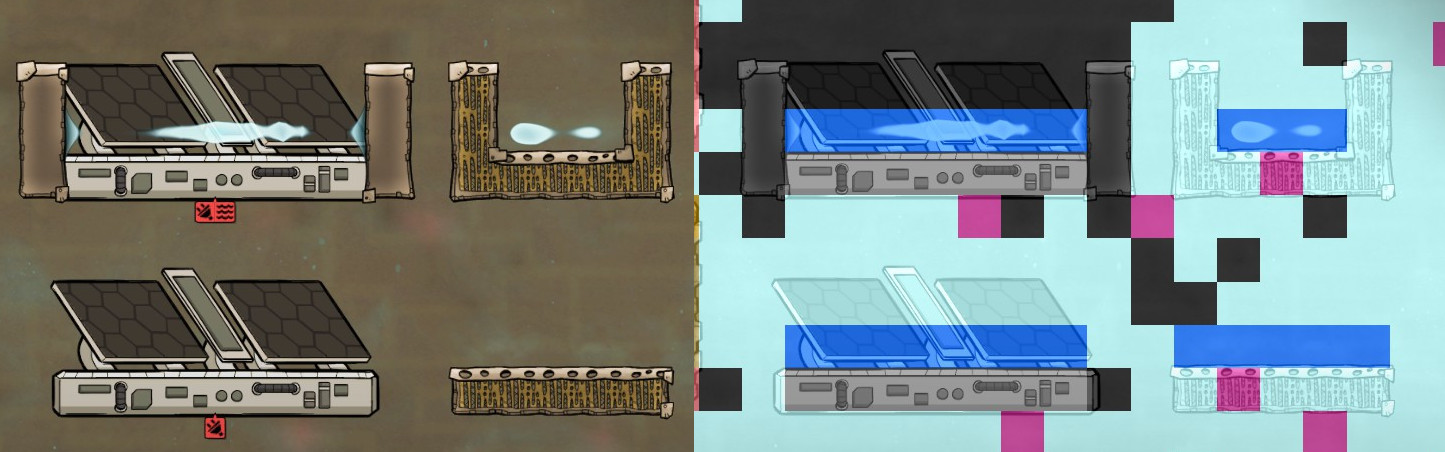
How to fix (as far as I can judge, given that the C++ sim code can't be easily decompiled):
- As can be seen, the "solid" tiles are in fact not formed by a solid element, but contain a gas (Airflow Tile) or vacuum (Solar Panel).
- Presumably the problem is that the code checks if the tile below is filled with a solid or liquid element, which fails here, so the code decides to render the liquid as falling.
- A fix would be to also check if the tile below is a constructed tile, but it seems that wouldn't work, as Solar Panel does not seem to set Sim.Cell.Properties.ConstructedTile for whatever reason.
- It should however work to check for Sim.Cell.Properties.LiquidImpermeable. Both Airflow Tile and Solar Panel set those (Solar Panel in MakeBaseSolid.ConvertToSolid()), and logically if a tile is LiquidImpermeable then for the purposes of liquid it should act the same way as solid tiles.
I imagine this must have been already reported, but since this is a bug in the C++ sim code, it can't be fixed at least in a mod (I've spent quite some time on this), so it'd be really nice if it got a somewhat higher priority to fix, especially since a fix appears to be fairly simple.
See picture. Build an Airflow Tile and drip water on top of it.
-
 3
3
A developer has marked this issue as fixed. This means that the issue has been addressed in the current development build and will likely be in the next update.
Create an account or sign in to comment
You need to be a member in order to leave a comment
Create an account
Sign up for a new account in our community. It's easy!
Register a new accountSign in
Already have an account? Sign in here.
Sign In Now