

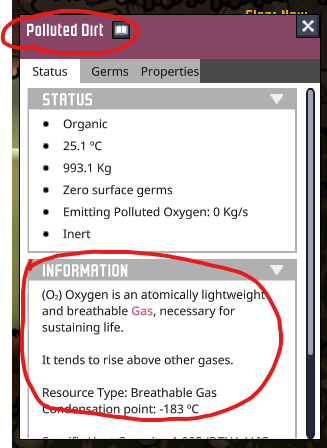
The information text string displays text for the previously selected entity if the previous pop up dialogue was closed by right-click
Steps to Reproduce
1. Select entity with left-click and observe information string
2. Right-click to dismiss pop-up
3. Select a different entity with left-click, observe that the information text from the dismissed pop-up from the previous entity is still displayed
4. Selecting the same entity again with left-click refreshes the information text to the correct entity
There are no comments to display.
Create an account or sign in to comment
You need to be a member in order to leave a comment
Create an account
Sign up for a new account in our community. It's easy!
Register a new accountSign in
Already have an account? Sign in here.
Sign In Now