

Originally there wasn't a search bar on the left of the research screen, and it was nice. After I clicked a button though, suddenly it popped up and now I can't figure out how to get rid of it.
Steps to Reproduce
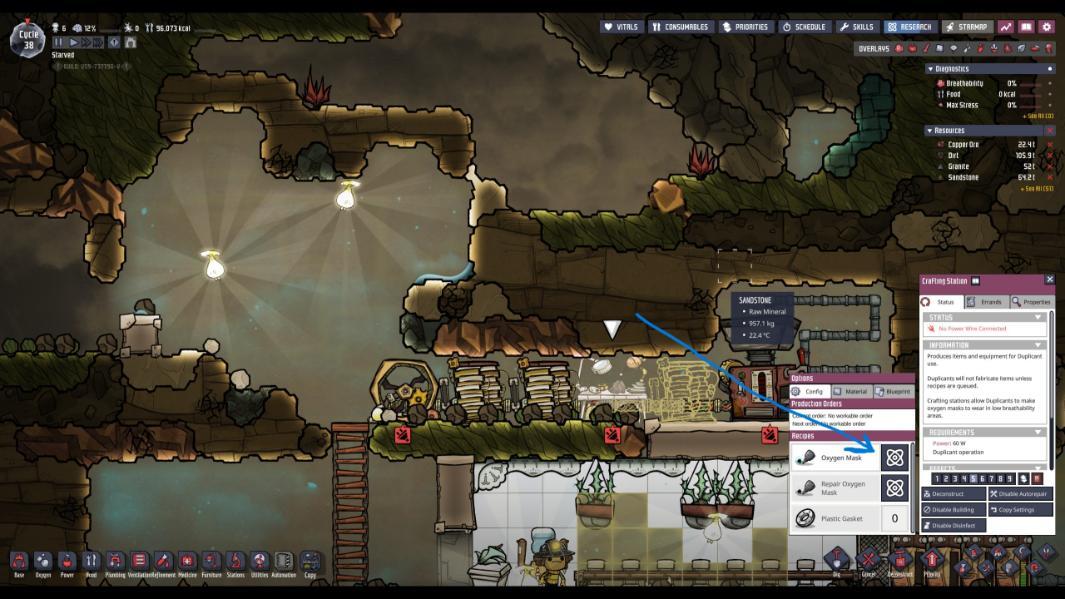
In the crafting station, you click the research icon button next to something there you haven't researched. It then shows you specifically the thing that must be researched to make it along with the filter search bar. Even after clicking out of research and reopening it, it's still there including when you leave and rejoin.
There are no comments to display.
Create an account or sign in to comment
You need to be a member in order to leave a comment
Create an account
Sign up for a new account in our community. It's easy!
Register a new accountSign in
Already have an account? Sign in here.
Sign In Now