

Last month I'm facing a severe issue when Don't Starve Together removes worlds I play in. Till this moment it happened 3 times.
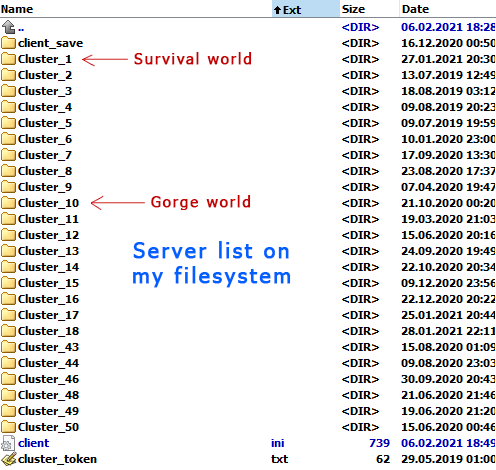
1st time I've lost a ~30 days world. I've checked folder with this world (Cluster_1) - and it was empty. After that I've created a brand new world - and game created it in the same folder.
Since I knew the game removes my worlds, I made backups after almost every time I shutted down the server. During playing in this world I switched to some old worlds I had before (IDK if it's an important detail, but still) and then decided to return to the "Cluster_1" - and it was already removed (so it was 2nd removal). As previously, I found the "Cluster_1" folder empty. I've restored my world from the backup I've made - and continued playing in this world.
After that I decided to play The Gorge event (via mod from Steam Workshop) in another old world - and after successful few tries my game crashed at server launch. After that I've noticed the game doesn't show the Gorge world. I've checked the corresponding world folder (Cluster_10), but files weren't removed. I've restarted the game, but there still was no world with Gorge event. Also noticed my previous world from Cluster_1 folder was displaying as 1-day world with no character selected (see the 1st screenshot). I've checked files for Cluster_1 - files weren't removed. Then I tried to launch the server - the game has created new session folder with new map generated (Cluster_1\Master\save\session\360A44029022F6FC); but the game was not started (it seemed like it stalled in a dead loop). So it was the 3rd time when I've lost 2 more worlds.
Few more details:
- Cluster_1 (survival) server mods (with Steam Workshop IDs): Show Me (666155465), Extra Equip Slots (375850593), Global Positions (378160973);
- Cluster_10 (The Gorge) server mods (with Steam Workshop IDs): Re-Gorge-itated (1918927570);
- client mods I use (with Steam Workshop IDs): Boss Indicators (1120124958), Combined Status (574636989), Craft Hotkeys (1920286184), Gesture Wheel (352373173), Gorge Detailed Summary (1421994079), Gorge Extender (1416911938), Keep Following (1835465557), Max Players Number (1978539160), Minimap HUD (345692228), Nightmare phase indicator (1298780476), Quick Drop - Client Version (873350047), Show Nicknames (956206484), Status Announcements (343753877), Wormwhole Icons [Fixed] (1295277999);
- usually it happens when I play The Gorge event for some time (but, probably, it's just coincedence);
- I also was playing in other worlds (mine and not);
- I was using "50 Saveslots" mod (369845558) before.
IDK the exact root cause of this bug and how exactly reproduce it. But it unprecedently annoying and demotivates me to continue playing this game and make any content for it...

I have no clear idea how to respoduce it.
I have some assumptins why it can happed:
- The Gorge mod;
- some bugs in the new world saving system (which was added recently and allows to create infinite number of worlds; probably it conflicts with The Gorge mod).
Update
I've found a stable way how to reproduce the issue:
0) you should have 9+ worlds created so that Cluster_1, Cluster_2, .., Cluster_10 folders exist on your filesystem (Cluster_1 should contain an usual survival world);
1) remove Cluster_10 world from your filesystem;
2) create new Gorge ("Re-Gorge-itated" mod: https://steamcommunity.com/sharedfiles/filedetails/?id=1918927570) world so that it go into Cluster_10 folder;
3) start the Gorge world with 2+ players;
4) finish the match;
5) start the Gorge match once again (without disconnecting from the server) - the game will crash with stacktrace (see screenshot) - exit the game;
6) launch the game - the Gorge world will absent in the worlds list (despite the fact it exists on the filesystem) and previous world from Cluster_1 will be lost.
Note: pay attention that there is no Global Positions mod enabled in the Gorge world (located in Cluster_10), but game mentions it in stacktrace when trying to start the world once again; this mod was enabled for world located in Cluster_1.

There are no comments to display.
Create an account or sign in to comment
You need to be a member in order to leave a comment
Create an account
Sign up for a new account in our community. It's easy!
Register a new accountSign in
Already have an account? Sign in here.
Sign In Now